Microsoft Copilot – AI assistant for Office, Windows & productivity
Microsoft Copilot – AI assistant for Office, Windows & productivity
Brief overview
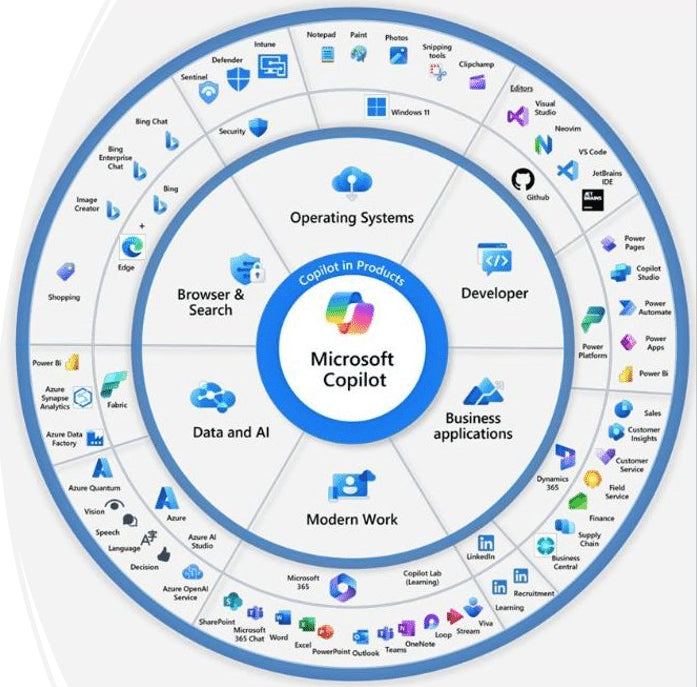
Microsoft Copilot is an AI-powered assistant that integrates directly into Windows, Microsoft 365, and various Microsoft applications. It provides support with text, analysis, research, and everyday work tasks.
Application areas
Text creation and email support.
Working with Word, Excel, PowerPoint and Outlook.
Research and summaries.
Increased productivity in everyday work.
How it works
The user asks questions or sets tasks directly in the Copilot interface.
The AI accesses Microsoft applications and content.
Results are proposed and further processed in a context-specific manner.
Advantages
Seamless integration into the Microsoft environment.
Very easy to use without additional tools.
Strong support for office and knowledge work.
High data security within the Microsoft ecosystem.
Disadvantages
Full features are only available with a paid subscription.
Heavily tied to Microsoft products.
Limited adaptability to specialized AI tools.
⭐ TechCompass rating
Overall rating:
★★★★☆ 4.4 out of 5 stars
User-friendliness:
★★★★★ 5.0 out of 5
Features:
★★★★☆ 4.4 out of 5
Speed:
★★★★☆ 4.3 out of 5
Quality of results:
★★★★☆ 4.2 out of 5
Price-performance:
★★★★☆ 4.0 out of 5
TechCompass classification
Microsoft Copilot is particularly suitable for users who already work intensively with Windows and Microsoft 365 and want to increase their productivity with AI support.
Problems and solutions
If features are missing, it's worth upgrading to Copilot Pro or Microsoft 365 plans.
For specialized tasks, a combination with other AI tools may be useful.
Mini-FAQ
Suitable for private users, companies and teams.
No technical expertise required.
Notice
Redirecting to an external provider. Usage and pricing are subject to the terms and conditions of the respective service.
Share